


Зачем нужен аккаунт на Viva-Games?
Пользователи, у которых есть аккаунт, могут сохранять игровой процесс на сервер в любой игре и создавать списки игр (как на Youtube, например).
Создание аккаунта абсолютно бесплатно и займёт всего минуту Вашего времени.
Для создания аккаунта просто кликните в блоке "Войти на сайт" иконку социальной сети, в которой у вас уже есть активный профиль и следуйте подсказкам.
Мы в соцсетях




Isotopia
https://viva-games.ru/game/isotopiaАвторы: Jorge del Llano, David Mochales, Beyker Soft, David Clemares
Жанр: Головоломки
Язык
- Русский
- English
Управление
- Интерфейс 2(?)
- Клавиатура(?)
Максимум игроков
- Один
Рассказать друзьям
Доступные версии
Доступные версии
- Аннотация
- Описание (пер.)
- Информация
- Аннотация
- Описание (пер.)
- Описание
Логическая головоломка для ZX Spectrum, где вы играете за самонадеянного ученого, запустившего неконтролируемую цепную реакцию. Теперь атомы возникают из ниоткуда, и ваша задача — спасти Вселенную, группируя их в стабильные молекулы.
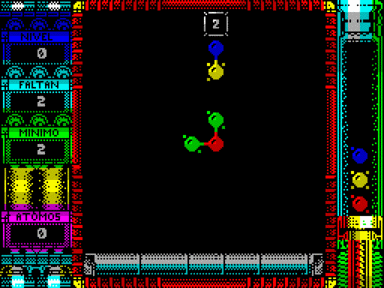
Управление осуществляется клавишами Q (вверх), A (вниз), O (влево), P (вправо), а пробел позволяет установить атом на поле. На игровом поле и в пробирке находятся атомы, имеющие от 1 до 4 электронов — это количество возможных связей с соседями. Перемещая курсор, вы должны размещать атомы так, чтобы они соединялись друг с другом. Молекула считается завершенной и исчезает, когда у всех ее атомов не остается свободных электронов.
Игра включает 100 этапов с разными целями: создать заданное число молекул, собрать молекулы из определенного количества атомов, очистить поле от фиксированных атомов или заполнить узор. Важно помнить, что фаза завершается, только когда на экране не остается ни одного атома. После каждых 10 уровней вы получаете ключ для быстрого старта с пройденных этапов.
Изотопия
Все предупреждали тебя, что эта формула, которую ты изобрел, будет опасной, но ты не послушал их, ты думал, что ты такой умный, и теперь ты вскидываешь руки вверх. Реакция уже идет, и атомы появляются из ниоткуда. Сгруппируйте их вместе и избавьтесь от них, если не хотите обрушить вселенную…
Инструкции по погрузке
Перезагрузите компьютер и выберите опцию загрузчика или введите LOAD””.
Сторона A: Версия +2A и +3
Сторона B: Версия +128 и +2
Управление
Q – Вверх
A – Вниз
O – Влево
P – Вправо
Space – установить/изменить атом
Совместимый джойстик Sinclair
Вы можете свободно перемещать курсор по доске в вертикальном и горизонтальном направлениях.
Чтобы поменять местами атомы на доске, просто встаньте на них и нажмите кнопку “огонь”. Атом на доске поменяется местами с первым атомом в пробирке.
Игра
Вы должны разместить атомы, попавшие в пробирку, на доске, пытаясь сгруппировать их вместе, чтобы получилась молекула. Игра заканчивается, если пробирка полностью заполнена атомами.
Каждый атом имеет от 1 до 4 электронов, которые символизируют количество связей, которые он может создавать с соседними атомами. Помещая атом на доску, он будет создавать как можно больше связей с окружающими его атомами, имеющими свободные электроны.
Атом всегда старается установить связи в упорядоченном порядке. Указатель всегда будет указывать, какие связи будут созданы в данной позиции при размещении следующего атома. Кроме того, указывается количество электронов в центре атома.
В пробирке появляется атом без электронов. Когда мы помещаем на доску атом с диким знаком, он установит максимальное количество связей, не имея лишних электронов, и всегда будет идеально подходить. Если он не может связаться с каким-либо атомом при размещении, он просто исчезнет.
Чтобы завершить молекулу, необходимо убедиться, что все атомы, входящие в ее состав, не имеют свободных электронов. После завершения он исчезнет с экрана.
В начале каждого этапа указывается цель, которую необходимо выполнить:
– Сделать X молекул: Вы должны выполнить определенное количество молекул. Любая созданная молекула будет считаться действительной независимо от количества составляющих ее атомов.
– Составьте X молекул, содержащих не менее Y атомов: Заполните ряд молекул, но для того, чтобы они были действительными, они должны состоять из минимального числа атомов. Любая молекула с меньшим количеством атомов исчезнет с экрана, но не будет считаться действительной.
– Устраните атомы: Вы должны очистить экран от атомов независимо от количества или размера завершенных вами молекул. В начале вы найдете несколько фиксированных атомов, размещенных на доске.
– Завершите узор: одна молекула должна занять все доступное пространство на игровом поле. Если все места не заняты, молекула исчезнет, но не будет действительной.
Важно: Ни одна фаза не будет завершена, пока на доске не останется ни одного атома!
Для завершения игры необходимо преодолеть в общей сложности 100 этапов.
Подсказки и предложения
1. хорошо подумайте, прежде чем поместить новый атом, постарайтесь как можно лучше организовать уже имеющиеся атомы, чтобы сэкономить место.
2. не разбрасывайте атомы по игровому полю, помните, что фаза не завершена, пока на экране не останется ни одного атома, независимо от цели.
Табло
На игровом табло вы можете получить следующую информацию:
Номер фазы
Количество молекул для завершения
Число атомов, которые должны быть у молекул, чтобы быть действительными.
Количество атомов, составляющих молекулу, на которой находится курсор.
Ключи
Каждый раз после прохождения 10 этапов игры будет выдаваться ключ, который можно использовать в стартовом меню, чтобы начать игру непосредственно с последнего пройденного уровня.
Схемы
атомы курсорные связи
Игра Isotopia запускается прямо на сайте. Головоломка, которую подарили миру Jorge del Llano, David Mochales, Beyker Soft и David Clemares, была опубликована командой OCTOCOM в 2007 году в Испании.
A logic puzzle game for the ZX Spectrum, you play as a rash scientist who triggered an uncontrolled chain reaction. Now atoms are appearing out of nowhere, and your task is to save the universe by grouping them into stable molecules.
You control the game with the Q (up), A (down), O (left), and P (right) keys, while the spacebar allows you to place an atom on the board. The game board and the test tube contain atoms with 1 to 4 electrons—the number of possible bonds with their neighbors. By moving the cursor, you must arrange the atoms so that they bond with each other. A molecule is considered complete and disappears when all its atoms have no free electrons left.
The game includes 100 stages with different objectives: create a set number of molecules, assemble molecules from a certain number of atoms, clear the board of fixed atoms, or complete a pattern. It’s important to remember that a stage ends only when all atoms remain on the screen. After every 10 levels, you receive a key for a quick start from the completed stages.
Isotopia
Everyone warned you that this formula you invented was going to be dangerous, but you didn’t listen to them, you thought you were so clever and now you’re throwing your hands up in the air. The reaction is already underway and atoms are coming out of nowhere. Group them together and get rid of them if you don’t want to collapse the universe…
Loading instructions
Restart your computer and select the loader option or type LOAD””.
SIDE A: Version +2A and +3
SIDE B: Version +128 and +2
Controls
Q – Top
A – Down
O – Left
P – Right
SPACE – Set/Change Atom
Compatible Sinclair joystick
You can move the cursor freely along the board in both vertical and horizontal directions.
To swap an atom on the board, simply stand on it and press fire. The atom on the board will be swapped with the first atom in the test tube.
The game
You must place the atoms that fall into the test tube on the board, trying to group them together to form a molecule. The game is over if the test tube is completely filled with atoms.
Each atom has 1 to 4 electrons which symbolise the number of bonds it can make with adjacent atoms. By placing an atom on the board it will make as many bonds as possible with atoms around it that have free electrons.
The atom always tries to establish the bonds in an orderly fashion. The pointer will always indicate which bonds will be made in that position when the next atom is placed. In addition, the number of electrons in the centre of the atom is indicated.
The wildcard atom appears in the test tube without electrons. When we place a wildcard atom on the board, it will establish the maximum number of bonds possible without having any extra electrons, always fitting perfectly. If it cannot bond with any atom when placed, it will simply disappear.
To complete a molecule you must ensure that all the atoms that make up the molecule have no free electrons. Once completed, it will disappear from the screen.
At the beginning of each phase, the objective to be completed is indicated:
– Make X molecules: You must complete a certain number of molecules. Any molecule created will be counted as valid regardless of the number of atoms that compose it.
– Make X molecules with at least Y atoms: Complete a number of molecules, but for them to be valid they must be made up of a minimum number of atoms. Any molecule with fewer atoms will disappear from the screen, but will not count as valid.
– Eliminate the atoms: You must clear the screen of atoms regardless of the number or size of molecules you complete. At the start you will find a number of fixed atoms placed on the board.
– Complete the pattern: A single molecule must occupy all the available space in the playing area. If all the spaces are not occupied, the molecule will disappear but it will not be valid.
Important: No phase will be completed until there is not a single atom left on the board!
There are a total of 100 stages to overcome to complete the game.
Hints and suggestions
1. Think carefully before putting in a new atom, try to organise the atoms already in place as well as possible to save space.
2. Do not discard atoms around the playing area, remember that the phase is not completed until there are no atoms left on the screen, regardless of the target.
Scoreboards
The game scoreboard provides you with the following information:
Phase number
Number of molecules to complete
Number of atoms that molecules must have to be valid.
Number of atoms making up the molecule on which the cursor is located.
Keys
Each time 10 stages of the game are cleared, a key will be provided which can be used in the start menu to start directly from the last level cleared.
Schemes
atoms cursor bonds
Isotopia
Todo el mundo te aviso de que esa dichosa formula que inventaste iba a ser peligrosa, pero no les hiciste caso, te creías muy listo y ahora te echas las manos a la cabeza. La reacción ya esta en marcha y no paran de salir átomos de la nada. Agrúpalos y deshazte de ellos si no quieres colapsar el universo…
Instrucciones de carga
Reinicia tu equipo y selecciona la opción cargador o teclea LOAD””
CARA A: Versión +2A y +3
CARA B: Versión +128 y +2
Controles
Q – Arriba
A – Abajo
O – Izquierda
P – Derecha
SPACE – Poner/Cambiar átomo
Joystick Sinclair compatible
Puedes desplazar el cursor libremente a lo largo del tablero en dirección vertical y horizontal.
Para cambiar un átomo del tablero solo tienes que colocarte sobre el y pulsar Disparo. El átomo del tablero se intercambiara con el primer átomo de la probeta.
El juego
Debes colocar los átomos que van cayendo a la probeta en el tablero intentando agruparlos entre si hasta formar una molécula. El juego se acaba si la probeta se llena de átomos completamente.
Cada átomo tiene de 1 a 4 electrones que simbolizan la cantidad de uniones que este puede realizar con los átomos adyacentes. Al colocar un átomo en el tablero creara tantas uniones como le sea posible con átomos de su alrededor que tengan electrones libres.
El átomo siempre intenta establecer las uniones con un orden. El puntero nos indicara en todo momento cuales serian las uniones que se realizarían en esa posición al colocar el próximo átomo. Además en el centro de este se indica el número de electrones de este.
El átomo comodín aparece en la probeta sin electrones. Cuando colocamos un átomo comodín en el tablero establecerá el numero máximo de uniones posible sin que le sobre ningún electrón, encajando siempre perfectamente. Si al ser colocado no puede establecer uniones con ningún átomo simplemente desaparecerá.
Para completar una molécula debes conseguir que todos los átomos que la componen no tengan electrones libres. Una vez completada desaparecerá de pantalla.
Al iniciar cada fase se indica el objetivo a completar:
– Haz X moléculas: Debes completar un número determinado de moléculas. Cualquier molécula creada será contabilizada como valida con independencia del numero de átomos que la compongan.
– Haz X moléculas con al menos Y átomos: Completar un numero de moléculas, pero para que sean validas deben estar formadas por un numero mínimo de átomos. Cualquier molécula con menos átomos desaparecerá de pantalla, pero no contabilizara como valida.
– Elimina los átomos: Debes dejar la pantalla limpia de átomos sin importar el número o el tamaño de las moléculas que completes. Al inicio encontraras un número de átomos fijos colocados en el tablero.
– Completa el patrón: Hay que conseguir una única molécula que ocupe la totalidad del espacio disponible en el área de juego. Si no se ocupan todos los espacios la molécula desaparecerá pero no será valida.
Importante: ¡No se completara ninguna fase hasta que no quede ni un solo átomo en el tablero!
Hay un total de 100 fases a superar para completar el juego.
Pistas y sugerencias
1. Piensalo bien antes de poner un nuevo átomo, intenta organizar lo mejor posible los átomos ya colocados y así ahorrar espacio.
2. No deseches átomos por el área de juego, recuerda que la fase no se supera hasta que no quede ningún átomo en pantalla sea cual sea el objetivo.
Marcadores
El marcador del juego te proporciona la siguiente información:
Numero de fase
Numero de moléculas a completar
Numero de átomos que deben tener las moléculas para ser validas.
Numero de átomos que componen la molécula sobre la que se encuentra el cursor.
Claves
Cada vez que se superen 10 fases del juego se proporcionara una clave que podrá ser utilizada en el menú inicial para comenzar directamente a partir del último nivel superado.
Esquemas
átomos cursor uniones
Ещё игры этого жанра


Сохранённые игры[X]
Справка[X]
Помощь уже в пути!
- x1
- x2
- x3
<<<<
<<<<
<<<<
Не забывайте периодически сохранять игровой прогресс на сервере (клавишей F8), чтобы уверенно продвигаться вперёд!
Если вы гость на сайте, то прогресс будет сохранён только в памяти браузера и потеряется при закрытии. Чтобы этого не произошло - просто войдите в свой профиль.
Для загрузки сохранённой игры жмите F3 или откройте меню "Диск" кнопкой на правой панели.
Если игра не запускается, или у вас есть вопросы по игре - задайте их ниже.


Не запускается или глючит игра, или не можете пройти? Спросите в комментариях.